# One-click Importing

1\. Go to **Agritec ->**  click **Import Demo**.

<figure><img src="https://2296017312-files.gitbook.io/~/files/v0/b/gitbook-x-prod.appspot.com/o/spaces%2F56trzRDNbQ6aCxfjhyG4%2Fuploads%2FZlHhafe2pXvCfo4kDXUm%2Fimage.png?alt=media&#x26;token=9de6fb0a-460c-465e-8355-de2aea955c63" alt=""><figcaption></figcaption></figure>

2\. Just click **Import Demo** and wait for the process to complete.

**Notice**: After importing demo data, if you see a missing image on the frontend, please do some steps below:

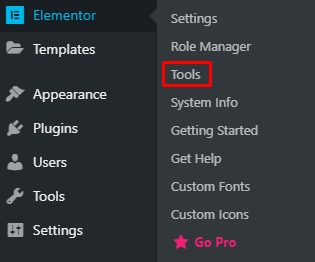
1. Go to **Elementor > Tools**

<figure><img src="https://7oroof-themes.gitbook.io/~gitbook/image?url=https%3A%2F%2Fcontent.gitbook.com%2Fcontent%2F9JBw3mnc5DS0PxI0yMwv%2Fblobs%2FJGi8EOS13wd72wmCrNfl%2Fimage10.png&#x26;width=768&#x26;dpr=4&#x26;quality=100&#x26;sign=e92d8455&#x26;sv=2" alt=""><figcaption></figcaption></figure>

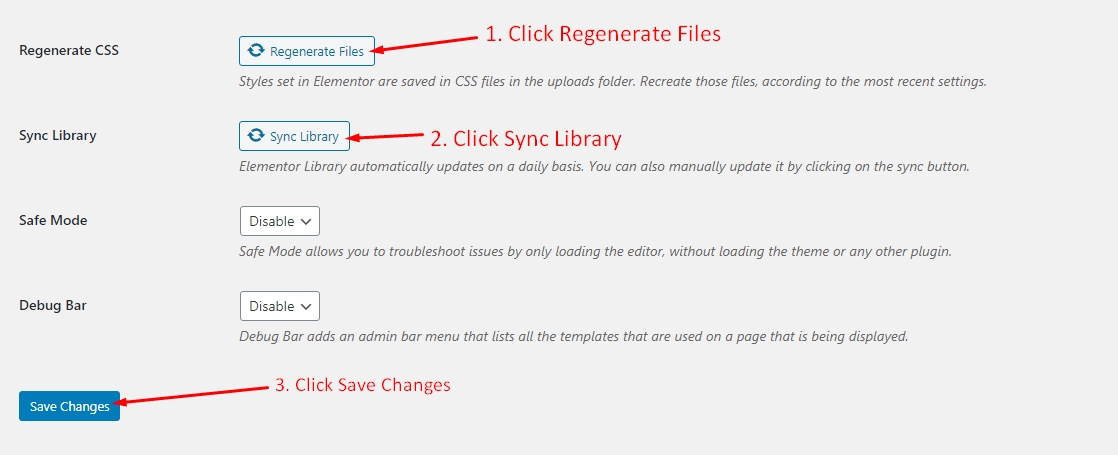
2\. Perform custom like:

<figure><img src="https://7oroof-themes.gitbook.io/~gitbook/image?url=https%3A%2F%2Fcontent.gitbook.com%2Fcontent%2F9JBw3mnc5DS0PxI0yMwv%2Fblobs%2FoZezDhWtL74RlUJGHbMD%2Fimage11.png&#x26;width=768&#x26;dpr=4&#x26;quality=100&#x26;sign=af37b39b&#x26;sv=2" alt=""><figcaption></figcaption></figure>

When finished, you will have a nice site.