# How To Update a Plugin

**I. CMS Portal Plugin**

1. Go to **Plugins** -> **Installed Plugins**

![](https://content.gitbook.com/content/56trzRDNbQ6aCxfjhyG4/blobs/O9PDQfMnjLWwhJrw4RLb/image2.png)

2\. Click the **update now** link inside the yellow alert under each installed Plugin.

![](https://content.gitbook.com/content/56trzRDNbQ6aCxfjhyG4/blobs/gz2EO8OM5VMYp0ceN6Bk/image%203.png)

3\. When you see the Updated alert show, you are done. Let's continue to do it with other old plugins.

![](https://content.gitbook.com/content/56trzRDNbQ6aCxfjhyG4/blobs/tpIQjqLCcvqTsfGLSs0n/image4.png)

**II. Other Plugins**

1. Go to **Agritec** tab **-> Dashboard**&#x20;

<figure><img src="https://2296017312-files.gitbook.io/~/files/v0/b/gitbook-x-prod.appspot.com/o/spaces%2F56trzRDNbQ6aCxfjhyG4%2Fuploads%2FNyhHRVCUEKsa0imQnBdv%2Fimage.png?alt=media&#x26;token=069fb828-5079-4556-8d29-30cabb85f7c0" alt=""><figcaption></figcaption></figure>

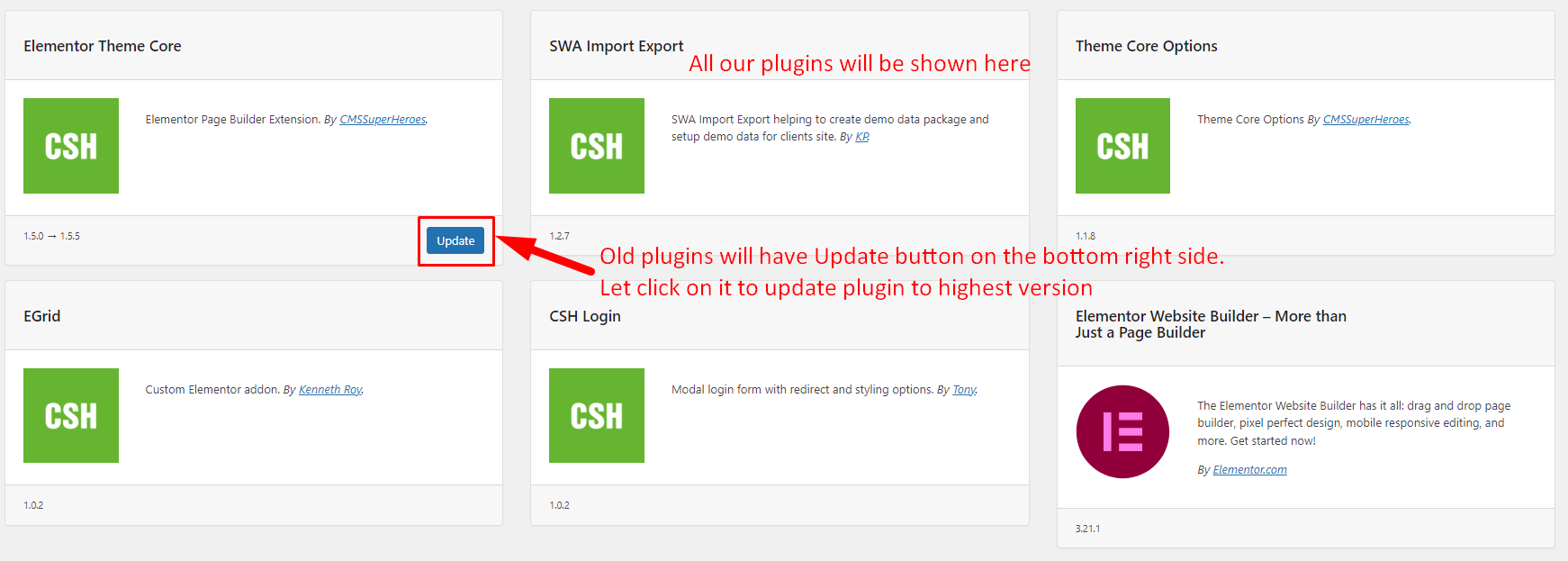
&#x20;2\. On the Plugin panel, click the **Update** button below the old plugins.

<figure><img src="https://content.gitbook.com/content/56trzRDNbQ6aCxfjhyG4/blobs/acDNWQlBXbkJWQBf0CYz/image.png" alt=""><figcaption></figcaption></figure>

3\. After all successfully, you are done.&#x20;